Setting up GNU
- Download and install the GNU backgammon program: Download GNU
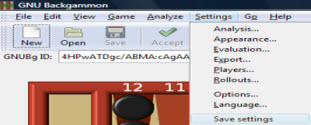
- Go to Settings
- Rollouts
- Change Trials to 15552
- Under Truncation Uncheck Truncate Rollouts
- Click Ok (everything should appear as it does in the screenshot below - except for the seed number which is fine)
- Go to Settings
- Rollouts
- Select the First Play Both tab
- Click Modify under the Move Filter
- Select Two Ply
- Under the first add extra change the number to 12
- Change the moves within to .160
- Click Ok
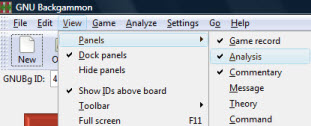
Go to Windows (If you have no Windows tab it's because you're on a newer build of GNU which is fine, you should have a View tab, under it you should make sure Analysis is checked)
Select Analysis
Click on Settings
Save settings
Once the rollout is finished click Ok
Select File
Save
Save it as a Game (and not a Position)
GNU will ask you if you want to overwrite the existing file, you select Ok
If you ever need to stop a rollout to reboot a computer or you're going away
for the weekend and you want to save it in case you come home and the electricity
has went off or whatever reason it's very simple and will have no affect on the results.
You simply hit Stop and then save it as per the instructions above. To restart
the rollout highlight the moves in the bottom left hand window (the analysis window)
and click Rollout just underneath, it should start right up again!